
AI content repurposing is becoming a major trend. More and more creators, marketers, and even big companies are adapting it to make their content work harder.
The idea is simple: why create content for just one platform when you can share it across many without spending extra time or effort?
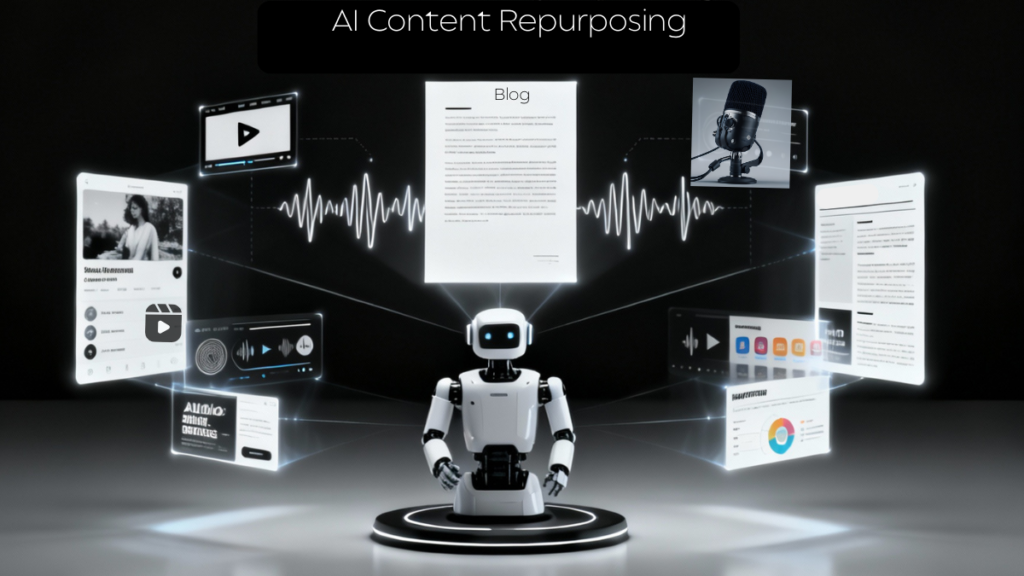
In simple terms:
AI based content repurposing means using artificial intelligence (AI) to turn one form of content, like an article, video, or podcast, into other formats such as social media posts, short clips, newsletters, or infographics.
If you are short on time, see the 15 AI content repurposing tools that help in transforming and repurposing one content format into multiple other formats that can be posted on various platforms, helping you maximize reach, saving time, money, and effort.
TL;DR: 15 AI Content Repurposing Tools (Full List in One Table)
Tools | Best For | Key strength |
OpusClip | Turning long videos into short clips | Viral scoring & auto-editing |
JoggAI | Creating AI podcast videos from audio, blogs, or videos | AI avatars & realistic dialogues |
NoteGPT | Turning blogs or explainer videos into two-speaker audio podcasts | Realistic dual-voices |
RightBlogger | Turning videos/audio into blogs | SEO-optimized long-form blogs |
Pictory | Converting text/audio to videos | High-quality visuals & voiceovers |
PostNitro | Creating carousels from blogs or text | Fully branded, editable carousels |
Fliki | Text to video & audio | Multilingual voices |
ImagineArt | Text to voiceovers & images | Long text handling, realistic output |
Wavve | Audio to audiograms | Auto detect audio clips, Soundwave animations |
Pixelhunter | Auto resizing image | One click image resizing for all platforms |
Gemini | Image to blog | Turns infographics into SEO blogs |
Repurpose.io | Multi-format automation, audio/ video repurposing | Auto-posting across platforms |
HubSpot Content Remix | Multi-format repurposing | Smart, centralized content hub |
Otter.ai | Transcribing & summarizing Spoken content (meetings, podcasts, webinars) | Smart summaries, speaker detection, and extracts highlights |
Descript | Transcribing and editing videos or audios for repurposing | Edit by typing; text-based video control. Create clips |
Free plans and trials are available for all the tools.
How I Tested These AI Content Repurposing Tools
While building The Digital Flock, I’ve spent the past year testing AI marketing tools across writing, image generation, video creation, email marketing, SEO, and content repurposing. For this guide, I evaluated 15 AI content repurposing tools using similar content inputs wherever possible so I could compare their output quality, ease of use, editing flexibility, supported content formats, pricing, and overall value more consistently.
Each tool was evaluated based on:
- Content quality: How well it transformed one piece of content into multiple formats while maintaining accuracy and context.
- Ease of use: How intuitive the interface was and how quickly I could generate usable content.
- Editing flexibility: The level of control available to customize, refine, or regenerate the output.
- Content formats supported: Whether the tool could repurpose blogs, videos, podcasts, social media posts, emails, or other content types.
- Pricing and value: Whether the features justified the cost and if a free plan or trial was available.
- Best use case: The type of creator or marketer who would benefit most from using the tool.
Transparency Note: Every recommendation in this guide is based on my independent hands-on testing and research. I have not accepted payment or sponsorship from any of the tools featured in this article.
If you’d like to see how these tools actually perform with real prompts, I have embedded videos and links to the repurposed content, scroll down to the detailed breakdowns for a deeper look.
- TL;DR: 15 AI Content Repurposing Tools (Full List in One Table)
- How I Tested These AI Content Repurposing Tools
- Why AI Content Repurposing Matters
- 15 AI Content Repurposing Tools for All Content Types
- How to Choose the Best AI Content Repurposing Tool for You
- Why AI Content Repurposing Works for Creators
- Conclusion: Making AI Work Smarter for Your Content
Why AI Content Repurposing Matters
The Problem with Traditional Content Creation
Every content creator knows this struggle:
- Writing a blog, creating a YouTube video, or recording a podcast takes hours, sometimes days.
- After all that effort, your content often just sits there on one platform.
- To share it elsewhere, you’d have to start almost from scratch like turning a blog into a video, make a podcast from that video, or cut clips for social media.
Before AI content repurposing, this was the reality.
It meant more time, more effort, and more stress, just to make sure your content reached the right audience.
This is where AI steps in.
AI Content Repurposing Changed the Game
Now, you can put your full energy into creating one valuable piece of content — and repurpose it into multiple formats for different platforms.
For example:
- Convert a blog into a video for YouTube.
- Turn a long video into short clips for Instagram or YouTube Shorts.
- Make a podcast from your video or blog content.
- Create carousel posts for LinkedIn from your blog sections.
Basically, with AI into the picture, you can:
- Now reach multiple audiences across multiple platforms with just one well-researched, valuable piece of content without creating new content from scratch every time.
- Let AI tools handle the conversions while you focus on doing what you do best, creating quality content once and letting it work everywhere.
I’ve also written a blog on actionable content repurposing strategies, including AI tools, examples and my personal workflow example where I turned a blog’s subsection into 6 different content formats for multiple social media platforms.
You can check it out if you’d like to see how it works in action.
Alright, now let’s get into the fun part – exploring AI-powered content repurposing tools for each format, with real examples from my own tests and experiences.
15 AI Content Repurposing Tools for All Content Types
If you’re short on time, you can jump to the table where all content repurposing tools are listed for a quick overview.
Or dive into the breakdowns below, where I’ve repurposed the content myself and included the videos, blogs, and visuals each tool generated.
Here’s how this section is structured:
- Tools are grouped by content type — video, text, audio, image, and multi-format.
- Some tools like Pictory, JoggAI, and RightBlogger appear multiple times because they work well across formats.
- The focus is on quality over quantity, only tools that truly deliver results.
Let’s get started with the first content format, Video and dive into video content repurposing tools.
Video Content Repurposing Tools
Here’s how to repurpose video content like long YouTube videos, webinars, tutorials, and meetings into short clips, podcast-style videos, or blogs with these AI tools.
OpusClip — Turn Long video into Short Clips
Turns long videos into ready-to-post short clips in minutes. From a 3.5-minute video, it auto-generated five clips of different lengths and gave a “viral score” to help pick the best ones.
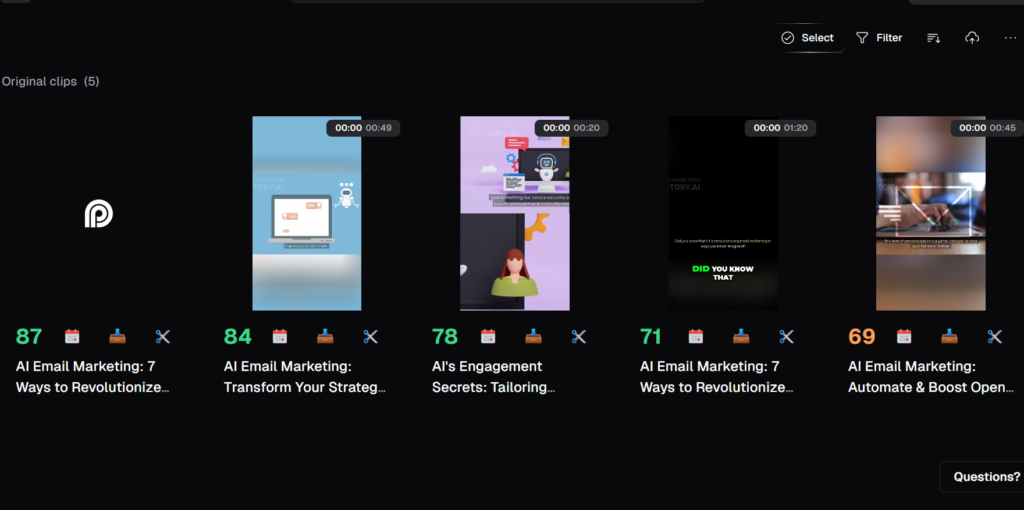
You can edit and publish directly to YouTube Shorts or Instagram Reels from OpusClip itself. Best AI content repurposing tool for turning long videos into multiple short video clips.
NoteGPT — Turn explainer/tutorial videos to Two-speaker audio podcast
It doesn’t just extract audio but also transforms a generic explainer video with just a voiceover or clips, into a natural two-person podcast with realistic AI voices.
I uploaded one of my explainer video links, and it generated a downloadable conversational podcast episode, ready to post on Spotify or Apple Podcasts.
You can check out the results by viewing these links:
My original explainer video’s YouTube link
Generated podcast link using NoteGPT.
JoggAI — Turns Explainer video into a Two-speaker podcast video
Converts solo/explainer videos into a podcast-style video with two realistic AI avatars talking to each other in a podcast setup, with auto-generated dialogue, lip-sync, and voices.
It’s visually engaging and gives a static explainer a conversational discussion-style angle — great if you want talk-show like video formats without the setup.
See the original video (link) and the converted video podcast below :
RightBlogger — Turn Video into a blog post
Paste a YouTube video link and it drafts a structured detailed blog with title, headings, keywords, bullets, etc.
When I tried it, it generated a 1.8k words blog from a 1-minute clip I uploaded.
Here’s the link to the Example blog generated from this video on Grooming tips.
If you click the link above to view the blog generated by RightBlogger, you’ll see it also includes the YouTube video’s link, which I used to write this blog after the intro of the blog.
Tip: If a tool only accepts YouTube links but your video isn’t uploaded there, upload your video as unlisted (so it won’t appear publicly) on YouTube and use that link.
Text Content Repurposing Tools
You can turn your blogs, newsletters, emails or notes into carousels, podcasts, videos, or visuals — giving your written content new reach across formats and platforms.
PostNitro.ai — Turn text/ articles into Carousel Posts
PostNitro instantly converts any blog, text, or X (Twitter) thread into ready-to-share carousel posts for Instagram or LinkedIn.
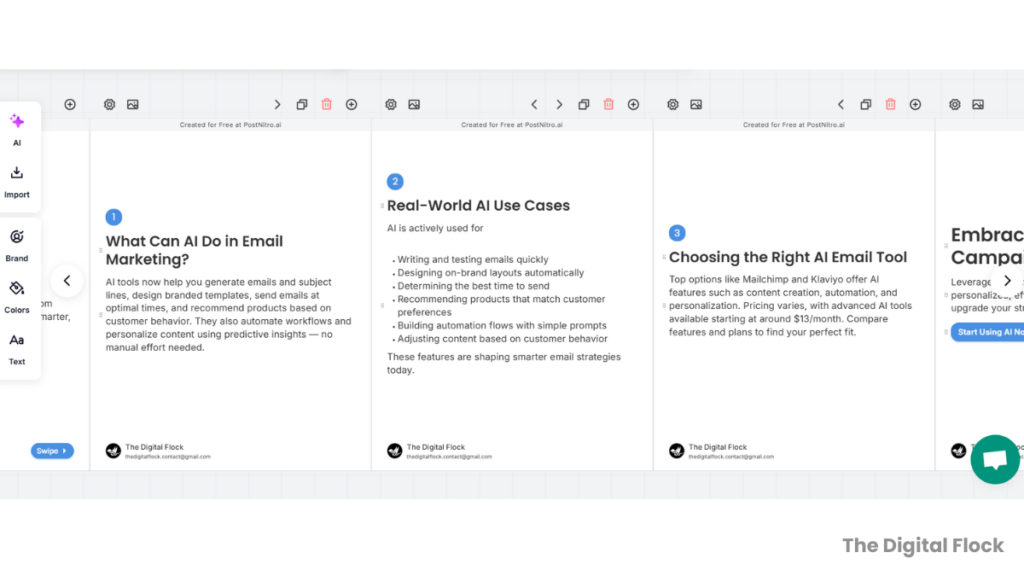
I tested it with my AI Email Marketing blog. I pasted the article’s link directly, added brief slide instructions, and it generated the carousel slides matching my blog’s content accurately.
You can select the number of carousel slides you want. I selected 5 slides.
You can customize fonts, colors, and add your website name or logo directly in the slides.
See the screenshot of the carousel I created with PostNitro :
JoggAI — Text to Conversational Podcast Video
Just like the explainer videos we saw in the video content repurposing tools part, JoggAI converts plain informational text (blogs, PDFs, Word files) into natural two-person podcast videos.
It automatically builds dialogue, assigns lines to avatars, and lets you edit both the script and voices.
It’s the best content repurposing tool for turning static text into lively, dialogue-driven podcast videos.
NoteGPT — Text to Audio Podcast
NoteGPT turns blogs or documents into realistic two-speaker podcasts within minutes.
Paste a blog link, text or upload a PDF, it voices it conversationally — great for turning written content into discussion-style audio podcasts, ready to upload on Spotify or Apple Podcasts.
Pictory & Fliki — Text to Video & Audio
Both tools do an excellent job turning written content into videos.
I’ve used Pictory to convert blog sections into voiceover-backed videos with captions and visuals, and Fliki for quick multilingual text-to-video and audio conversions.
They were among the top performers in my Text-to-Video Tools Comparison — tested using the same prompt.
ChatGPT — Repurpose or Rewrite Anything
ChatGPT helps convert blogs into LinkedIn posts, captions, X threads, or even short scripts for voiceovers or videos. You can talk to it like a human.
I also use its “Photorealistic Images and Videos” GPT to design most of my blogs’ cover images and creative visuals; in fact, I created this blog’s cover image using it.
It’s an evergreen AI writing tool that is best for multi-purpose work, whether it’s text repurposing, rewriting, content ideation or image creation, in my case, especially.
You can check out our AI writing tools comparison blog to see how they assist you in writing, researching and ideating content.
ImagineArt — Text to Voice & Infographics
Imagine.art can turn long text (up to 40,000 words) into natural-sounding voiceovers or infographic-style visuals.
In my Text-to-Image Tools Comparison test, it ranked 3rd with a rating of 4.9/5 among the top 15 AI tools for generated image quality, prompt accuracy and creativity.
Audio Content Repurposing Tools
These tools help you repurpose podcasts or voice recordings into videos, blogs, or social-ready clips — giving your audio new reach across formats.
Wavve — Audio to Shareable Audiograms
You can turn your audio into shareable video clips.
Wavve turns your audio podcasts or clips into short video clips called audiograms – basically audio snippets paired with a static image of your choice, and an animated sound wave, that can be shared on YouTube Shorts or Reels.
I created a 1-minute audiogram from a 3.5-minute audio clip using Wavve, and added my blog’s cover image as the static image.
Here’s the YouTube Shorts link to the audiogram I created
Perfect for podcasters without video footage who still want to share audio highlights in a visually appealing way on social media like reels or shorts.
Pictory — Audio to Engaging Videos
Pictory automatically converts audio into full videos with AI-generated scripts, voiceovers and matching visuals.
You can tweak scenes, captions, and visuals from its stock library or add your own clips.
RightBlogger — Audio to Blog Posts
Like videos and text, you can upload any podcast or audio file, and Right Blogger converts it into a structured blog with headings, subheadings, keywords and clear formatting.
I tested it with a short 1-minute podcast — it produced a detailed, well-written SEO optimized article.
JoggAI — Podcast Audio to Video Podcasts
JoggAI converts two-speaker podcast audio into realistic video podcasts with synced lip movements and AI avatars. It also keeps the original voices from the audio.
Ideal for podcasters who want to turn existing audio episodes into video podcasts for platforms like YouTube but without any setup or recording.
Image Content Repurposing Tools
Repurpose infographics and images into detailed blogs, and resize them into different content format sizes of different platforms in just one click.
Pixelhunter – One-Click Image Resizing for All Platforms
Pixelhunter lets you instantly resize a single image for multiple platforms.
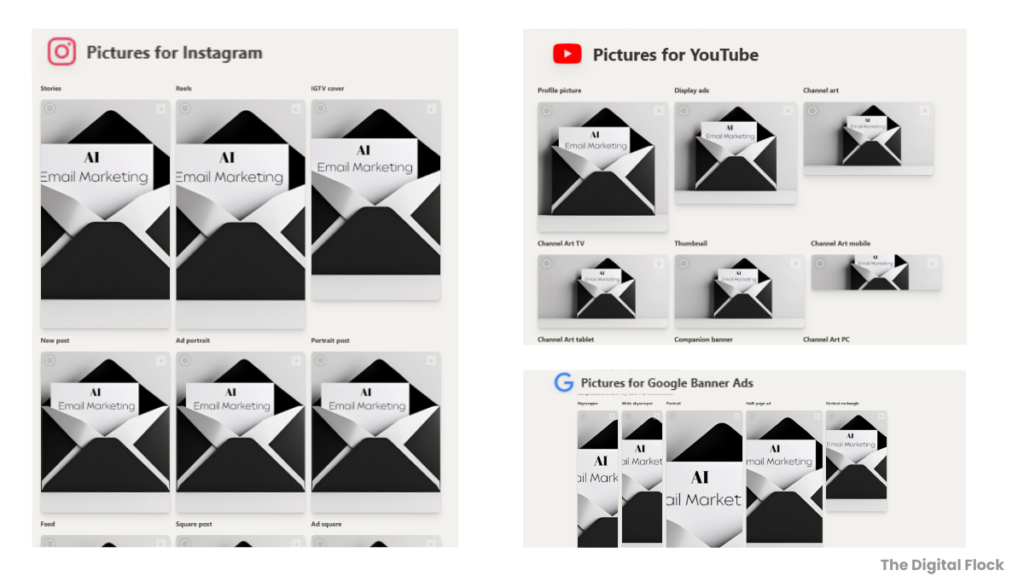
I uploaded an image I designed for my AI email marketing blog in landscape size, and it automatically generated versions for Instagram (feed, story, reel, ads), Facebook (post, cover, ads), LinkedIn (post, banner, ads), and more, all in one click.
Here are screenshots of how the tool resized a single image I uploaded into several sizes, optimized for different content formats and platforms.
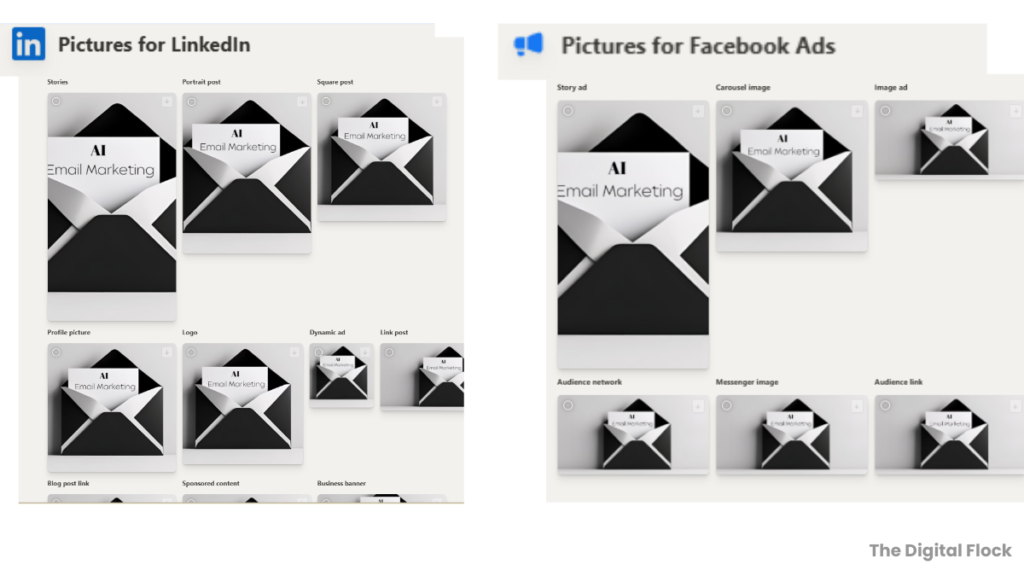
It’s best for creators and marketers who want quick, platform-ready visuals from a single upload.
Gemini — Turn Infographics/ Images into Full Blogs
Gemini can transform infographics or information-rich images into complete, SEO-optimized blog posts.
I uploaded an infographic on 7 AI Marketing Use Cases, added my focus keyword, and Gemini generated a detailed, structured blog from it.
See my Gemini chat screenshot below, along with the infographic and blog it generated:

Here’s the link to the full blog generated by Gemini.
So far, we’ve seen tools that specialise in a single format. But what if you want one platform that does it all?
That’s where multi-format content repurposing software comes in.
All-in-One/ Multi-Format Content Repurposing AI Tools
HubSpot’s Content Remix
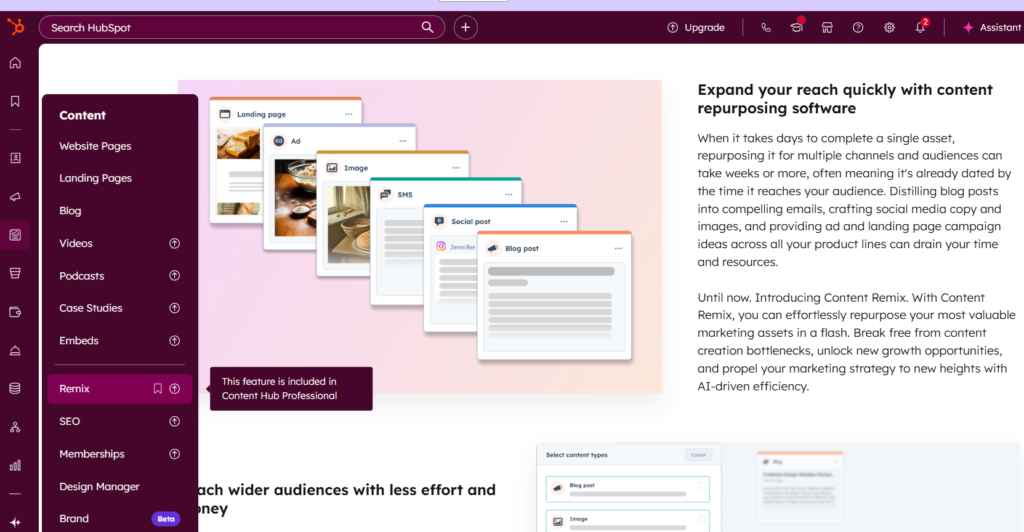
Content Remix is a feature within Breeze, HubSpot’s AI-powered platform. HubSpot’s Content Remix lives up to its name by letting you repurpose text, video, audio, and image content, all within a single platform.
It automatically tailors repurposing options depending on the content type you upload, making it both smart and intuitive.
Here’s a screenshot of Breeze’s dashboard and where you can find the content remix feature for repurposing content:
What it can do:
- Convert blogs or text into emails, ad copies, or social posts and more
- Transform videos into short clips, summaries, audio or highlight reels
- Turn audio or podcasts into blog-style summaries or transcriptions, and more
- Repurpose images into visual posts, carousels, or video slides
Why it stands out:
Everything happens in one clean dashboard, no switching between tools or formats. Its format-specific logic keeps repurposing workflows efficiently and clutter-free.
Ideal for Marketers, creators, and brands managing multiple content types across platforms.
Repurpose.io
Repurpose.io automates multi-platform content distribution, connecting YouTube, TikTok, Instagram, Spotify, Apple Podcasts, Facebook, Google Drive, Dropbox, and more — so you can repurpose once and publish everywhere effortlessly.
How it works:
Repurpose.io follows a simple source-to-destination workflow:
Just pick a source (where your content lives) and a destination (where you want it published).
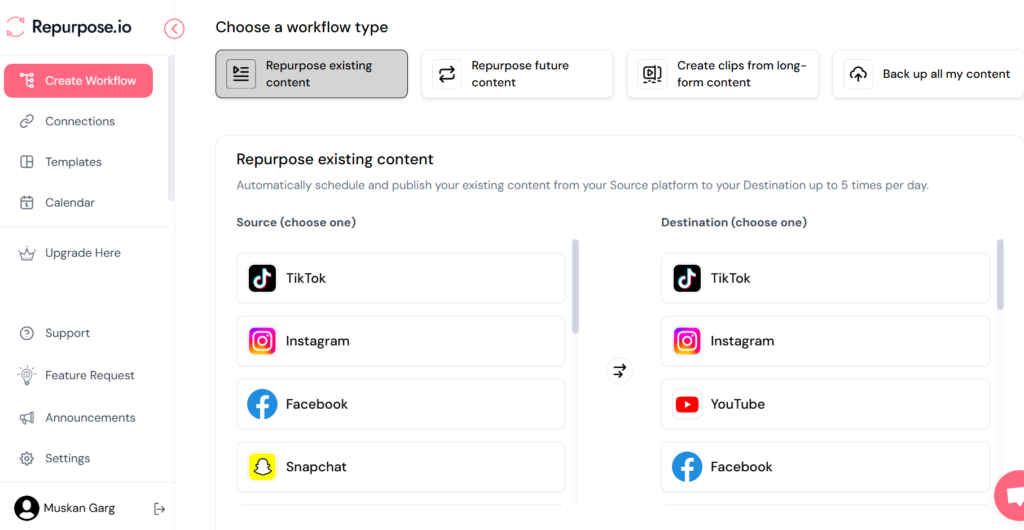
It then pulls your content, converts it (like trimming long videos into clips or turning podcasts into video posts), and publishes it automatically.
You can even set hands-free workflows such as:
“Whenever I upload a podcast, create a short video clip and post it to YouTube Shorts and TikTok.”
What Repurpose.io can do:
- Repurpose videos into short clips, Reels, or Stories
- Turn podcasts into video posts with waveform visuals
- Transcribe audio or video
- Auto-publish or schedule posts across multiple platforms
- Pull content from Google Drive or Dropbox
- Manage multiple accounts from one dashboard
Repurpose.io saves hours of manual work by automating repurposing and posting across platforms.
Best for: Podcasters, video creators, and marketers who want to automate repurposing and distribution effortlessly.
Descript & Otter.ai
Descript lets you import videos or audio files, auto-transcribe them, and even edit videos by editing the text — when you delete words, the corresponding video parts get cut.
Otter.ai, on the other hand, focuses on turning spoken content — from meetings, webinars, podcasts, or uploaded videos — into transcribed text, summaries, and highlights.
It’s perfect for extracting quotes, notes, or blog-ready content from longer recordings.
These tools are ideal for creators, podcasters, or professionals who want to repurpose spoken or video content into clips, posts, or text-based formats efficiently.
After going through all these AI tools for repurposing content, the next step is to choose one as per your content needs and goals. So, let’s talk about how to choose the one that fits you best.
How to Choose the Best AI Content Repurposing Tool for You
After exploring these tools, the right one for you depends on your content type, workflow, and how you prefer to repurpose content.
If you’re still figuring out how to repurpose content effectively, I’ve grouped the tools above by format — video, text, audio, and all-in-one — so it’s easier to find what aligns with your needs.
Here’s a simple guide to make your choice a little easier:
Match with your main content type
- Video creators can explore OpusClip or JoggAI.
- Text-based creators can try Pictory, ImagineArt, or PostNitro.ai.
- Podcasters can go for RightBlogger or Wavve, while infographic creators can use Gemini or Pixelhunter.
- And if you want one tool for all formats, Repurpose.io or HubSpot Content Remix covers everything.
Choose your level of control
If you prefer quick, done-for-you results, use automated tools like Repurpose.io.
Tools like Pictory, JoggAI, RightBlogger, or PostNitro.ai offer more flexibility to edit visuals, scripts, or content before publishing.
Align with your goal — visibility, automation, or creativity
If your goal is to reach across platforms for visibility, pick tools that support multi-channel posting.
If you want automation, choose tools with “set-and-forget” workflows.
If you care about creativity and editing, use AI tools that let you edit and personalize visuals, voices, and tones.
Adapt to your scale and workflow
Solo creators or small teams can start with single-format tools tailored to their main content type — video, text, audio, or visuals — to stay consistent and efficient.
Brands or agencies handling multiple platforms can streamline their process using all-in-one tools like HubSpot Remix or Repurpose.io.
Experiment and refine
Every tool performs differently depending on your niche and content style.
Experiment with a few — like you’ve seen me do in this blog — and find what feels natural to your workflow and goals.
Now that you’ve gone through the AI tools, let’s see why AI content repurposing benefits creators.
Why AI Content Repurposing Works for Creators
Saves time and effort
You no longer have to sit for hours rewriting or re-editing your old content. AI does the heavy lifting — turning one piece into many — so you can focus your energy on creating fresh ideas or refining strategy.
Boosts content visibility
Instead of sticking to one platform, you can now show up everywhere — YouTube, Instagram, LinkedIn, podcasts, and more — without doubling your workload. AI helps your content travel farther with minimal effort.
Reaches different audience types
Not everyone consumes content the same way. Some love watching videos, others prefer reading or listening.
AI bridges that gap by helping you deliver the same message in multiple formats, meeting each audience where they are most active.
Keeps your message consistent
AI ensures your tone, voice, and brand personality stay the same — whether it’s a tweet, blog, or video script. That way, your audience always recognizes your style, no matter where they find you.
Revives old content
That blog you wrote months ago or that old podcast episode gathering dust? AI can breathe new life into it — turning it into updated posts, reels, or visuals that feel fresh and relevant again.
Improves SEO and discoverability
The more formats your content appears in, the more digital “doors” you open for people to find you. AI helps multiply your visibility across search engines and platforms, giving each piece a better chance to rank.
Saves creative energy
Instead of constantly brainstorming new topics, you can simply extract smaller posts, snippets, or clips from what you’ve already made. It keeps your content engine running without draining your creativity.
Delivers better ROI
With AI, one piece of content can drive traffic, engagement, and conversions across multiple platforms. You get a higher return on the same effort — more output, without more hours.
Makes consistency easier
Even solo creators or small teams can stay active and visible across channels. AI removes the burnout that comes with constant creation, letting you maintain a consistent presence effortlessly.
Streamlines team workflows (for brands)
For larger teams, AI simplifies the entire content pipeline from creation to distribution. It reduces production costs, cuts manual workload, and keeps every channel aligned under one strategy.
Finally, let’s wrap it up with some interesting insights and helpful takeaways from this guide on AI content repurposing with the tools.
Conclusion: Making AI Work Smarter for Your Content
AI content repurposing isn’t just a shortcut, it’s a smarter, more sustainable way to create or recreate.
Instead of spending hours recreating content for every platform, you can now focus on crafting one high-quality piece and let AI multiply its impact across formats.
Whether you’re a solo creator managing your brand or part of a marketing team handling multiple channels, the right content repurposing tool helps you save time, stay consistent, and reach more people without feeling overwhelmed.
So start small. Pick one of your existing videos, blogs, or podcasts, choose the right tool from this guide, and try repurposing it into a new format.
Once you see the results, you’ll realize it’s not about doing more; it’s about doing it smarter.
About the Author

AI marketing strategist & founder of The Digital Flock, specializing in AI tools, AI SEO, and content automation. She applies AI in real marketing workflows and documents the results through strategies, tutorials, and case studies to help marketers use AI practically.